TLDR
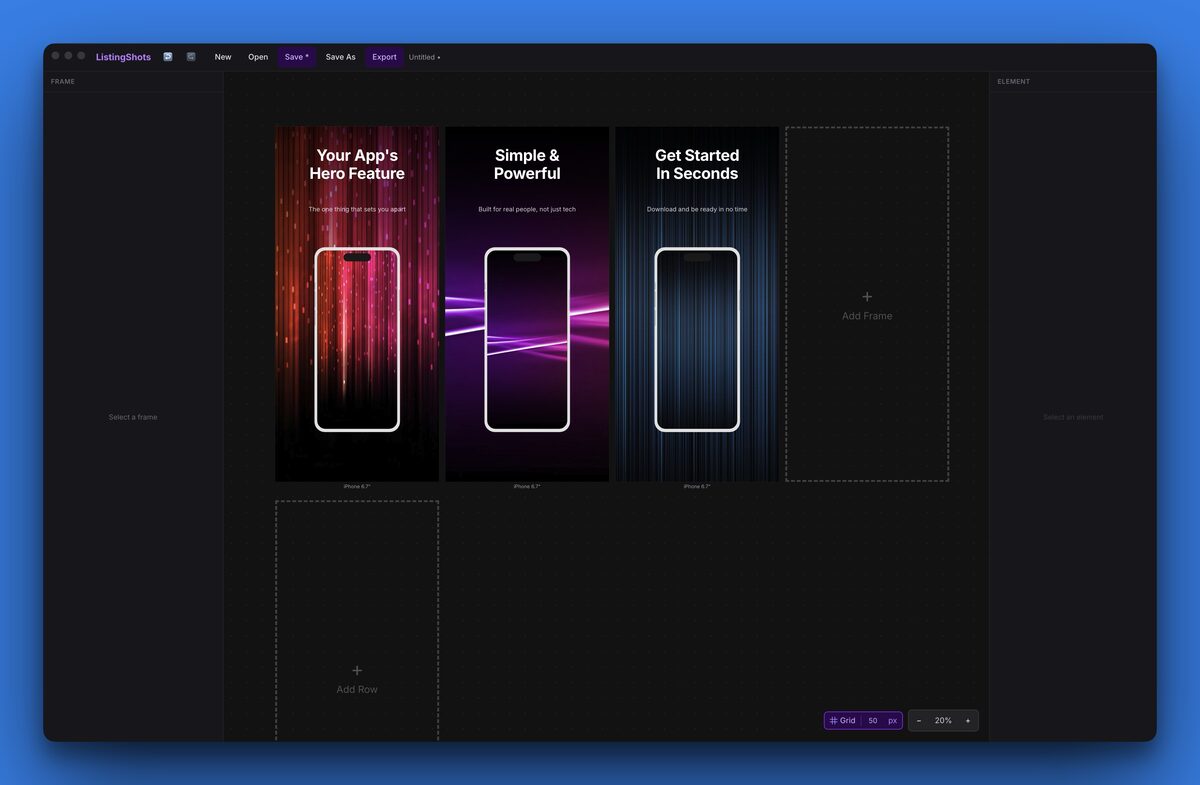
Is there a one-time purchase desktop app for making App Store and Google Play screenshots offline? Yes. ListingShots is a perpetual-license Mac and Windows app that produces pixel-correct App Store, Google Play, and Microsoft Store screenshots locally, without an account, a cloud upload, or a recurring subscription.
Is there a one-time purchase desktop app for making App Store and Google Play screenshots offline?
For indie developers, the practical short answer is: install once, activate with a license code, and you have a fully working screenshot studio on your laptop that does not need an internet connection ever again. Source files, brand assets, and project history live as plain files on your disk. There is no vendor account to manage, no cloud sync, and no migration if you ever switch tools.
Why pick a desktop screenshot app over a cloud SaaS?
The privacy story matters most for unreleased builds. Screenshots from a feature you have not announced yet are competitive information. Piping them through a cloud editor expands the surface area that data lives on. A local-first app keeps every frame on the same disk as your source code.
Vendor risk is the quieter problem. Cloud screenshot tools have been acquired, sunset, or pivoted away from indie pricing more than once. When that happens the templates you built and the projects you saved go with them. A perpetual desktop license decouples your work from a vendor's roadmap.
What does a one-time purchase save versus a subscription over five years?
Five-year cost of ownership for a single seat on a $10/month SaaS plan totals $600. The same five years on ListingShots is $15.99, paid once. The chart below shows the cumulative subscription cost climbing month by month against the flat one-time license. For each tool's current price, see the best App Store screenshot generators, with prices.
Cumulative cost over 60 months
$600
$450
$300
$150
$0
0 mo
12
24
36
48
60
ListingShots — one-time $15.99
SaaS subscription — $10/month = $600 over 5 years
How does ListingShots work as a Play Store screenshot generator for App Store and Microsoft Store?
Every preset is at native store resolution, so there is no down-scaling step and no surprise at upload time. The diagram below shows the four reference device sizes side by side at relative scale.
Reference device sizes
iPhone 17 Pro Max
1320×2868
App Store
13″ iPad
2064×2752
App Store
Android phone
1080×1920
Google Play
MS Store desktop
2160×1440
Microsoft Store
How do local desktop tools compare to cloud screenshot makers?
Pricing model | Stores supported | Runs offline | Account required | 5-year cost / seat | |
|---|---|---|---|---|---|
ListingShots | $15.99 one-time | App Store · Google Play · Microsoft Store · 44 more | Yes | None | $15.99 |
Subscription cloud generator | $10–$20 / month | Varies, often App Store + Google Play only | No | Required | $600–$1,200 |
Is the workflow really offline, with no account or telemetry?
The license file lives on your machine. You can disconnect a laptop on a flight, keep working on screenshots, and ship them when you land. No “authenticate to continue” modal ever interrupts the flow.
What does the workflow look like from screenshot to store upload?
Step 1
Drop raw screenshots
Pull frames straight from Xcode or Android Studio into the project background picker.
Step 2
Design once
Pick a template, add captions, place device frames. The canvas matches native pixel size.
Step 3
Batch export per store
One click writes correctly sized PNGs into App Store, Google Play, and Microsoft folders.
Which app store screenshot template should you start from?
Templates skip the blank canvas problem. Each one slots a device frame, a caption, and a background gradient into the correct positions for the storefront you are targeting, so the very first export already looks shippable. Swap the typography, hex colors, and frame style without rebuilding the layout from scratch.
Categories cover product walkthroughs, feature spotlights, before-and-after pairs, and quote-style captions. Duplicate one template across an entire project, change the screenshot inside each device frame, and you have a cohesive five-screen carousel ready for App Store Connect or the Play Console in one sitting.
Data points
Specs, prices, and source notes
Apple App Store accepts PNG or JPEG only, in sRGB, with no transparency and a 10 MB per-file size cap.
Source: Apple App Store Connect Help: Screenshot specifications
The 6.9-inch iPhone 17 Pro Max requires 1320×2868 pixel screenshots.
Source: Apple App Store Connect Help
The 13-inch iPad reference screenshot size is 2064×2752 pixels.
Source: Apple App Store Connect Help
Google Play accepts phone screenshots up to 1080×1920 pixels at 16:9 or 9:16.
Source: Google Play Console Help: Add preview assets
Microsoft Store desktop screenshots use a 2160×1440 reference resolution.
Source: Microsoft Partner Center documentation: App screenshots
ListingShots ships 47 platform presets at native resolution across App Store, Google Play, Microsoft Store, Chrome Web Store, YouTube, Steam, and more.
Source: ListingShots
26 starter templates are bundled so you skip the blank canvas.
Source: ListingShots
ListingShots is a perpetual one-time license at $15.99, not a recurring subscription.
Source: ListingShots
All assets are processed locally with no telemetry and no account requirement.
Source: ListingShots
Batch export writes App Store, Google Play, and Microsoft Store sizes from a single canvas in one click.
Source: ListingShots
FAQ
Frequently asked questions
Install a local desktop app such as ListingShots. Drop your raw screenshots into a project folder, design with built-in device frames and templates, and export to PNG. The app never sends source files, fonts, or finished images to a remote server, so unreleased app builds stay entirely on your machine.
ListingShots is built around all three storefronts. It ships current pixel specs for iPhone, iPad, Android phones and tablets, and Microsoft Store desktops. Design one master canvas, then batch export every required size from the same project without paying per platform or switching between separate tools.
With a cloud tool, your templates, assets, and project history live on the vendor's servers. If the company sunsets the product, gets acquired, or kills the free tier, you lose access. A one-time desktop app keeps every project file on your disk, so a shutdown never erases past work.
Not with a desktop app that ships all three storefront specs. Many roundups skip Microsoft Store entirely, which forces Windows indies to combine two or three tools. ListingShots collapses the workflow into one project, with per-store export folders that match each console's upload format.
After activation, ListingShots runs with the network turned off. There is no recurring license ping, no usage telemetry, and no remote font loader. The license file lives on your machine, so you can disconnect the laptop on a flight and keep shipping new screenshots.
Most one-app migrations finish in an afternoon. Export your finished PNGs from the SaaS tool, note hex colors and font names, then build a single master template inside ListingShots. Future updates take minutes. Cancel the subscription before the next renewal to lock in the savings.
Comparing ListingShots to subscription tools?
Read the full AppLaunchpad vs ListingShots breakdown — one-time license economics, 5-year cost charts, feature overlap, and migration steps in one place.
AppLaunchpad vs ListingShots
External references
Apple App Store Connect Help: Screenshot specifications
Authoritative source for current iOS screenshot pixel dimensions, color profile, and file size limits.
Google Play Console Help: Add preview assets to showcase your app
Official source for Google Play screenshot aspect ratios, minimum resolutions, and asset counts.
Microsoft Partner Center documentation: App screenshots
Official source for Microsoft Store screenshot size requirements and accepted file formats.
✦
Stop renting your screenshot tool
One-time purchase. No subscription. No account. Local-first, forever.
macOS 12+ · Windows 10+ · One-time purchase