TLDR
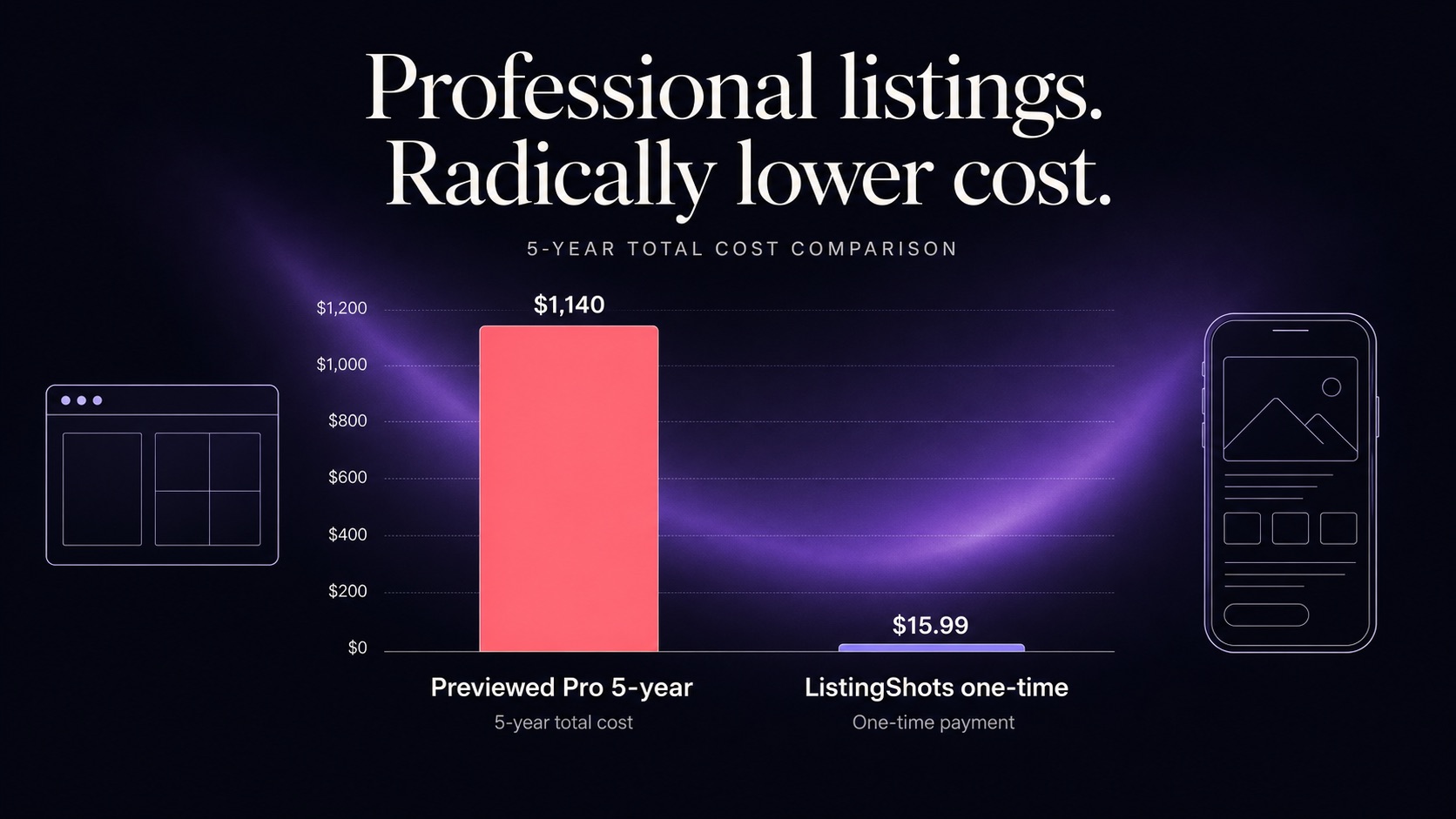
Previewed vs ListingShots: which is cheaper over five years for a Windows indie dev? ListingShots, by a wide margin. Its $15.99 one-time desktop license stays at $15.99. Previewed's Pro plan costs around $228 per year, totaling roughly $1,140 across five years — and Windows indie devs get a native install on top.
How Previewed and ListingShots price themselves today
The two products start from opposite assumptions. Previewed treats the screenshot tool as ongoing infrastructure — keep paying, keep generating. ListingShots treats it like an IDE — buy it, install it, ship with it. For a Windows indie dev who ships a launch and then iterates on updates, the pricing model usually matters more than the visual feature gap between the two apps.
Previewed vs ListingShots: which is cheaper over five years for a Windows indie dev?
Subscription cost compounds quietly. $19-per-month equivalent looks reasonable in isolation, but five years on the same plan adds up to roughly $1,140 per seat for the same template library you started with. The chart below shows cumulative tool cost at year 1, year 3, and year 5 for Previewed Pro versus a single ListingShots license.
Cumulative tool cost — 1, 3, and 5 years
$228
$9.99
$15.99
Year 1
$684
$9.99
$15.99
Year 3
$1140
$9.99
$15.99
Year 5
Previewed Pro — $228/yr (~$19/mo billed annually)
Previewed — $9.99 one-time (capped at 10 exports)
ListingShots — $15.99 once
Criterion | Previewed | ListingShots | Why it matters for a Windows indie dev |
|---|---|---|---|
Payment model | Free, $9.99 one-time (10 exports), $19/mo Pro billed annually | $15.99 once, perpetual | Fixed cost vs. recurring bill across launches |
5-year total (Pro vs one-time) | ~$1,140 | $15.99 | Five-year delta is roughly $1,124 per seat |
Native Windows app | No (Chrome only) | Yes (native installer) | Local-only workflow without a browser tab |
Runs offline | No | Yes | Travel, conference Wi-Fi, vendor outages |
Account required | Yes | No | No vendor lock-in or session-token churn |
Store presets | ~30 device options, ~10 templates | 47 platform presets, 26 templates | App Store, Play, Microsoft Store, Chrome Web Store |
Promo video / 3D / panorama | Yes | No (flat PNG only) | Only relevant if launch needs animated assets |
Unreleased UI stays on disk | No — cloud-stored | Yes — local-only | Pre-launch builds avoid third-party servers |
Feature parity as App Store screenshot generators
On the flat-PNG path that the App Store, Google Play, Microsoft Store, and Chrome Web Store actually require, both tools land your screenshots in the right pixel boxes. ListingShots leans into preset breadth — 47 platform sizes across the four major stores — and offline batch export. Previewed leans into motion and depth: animated app previews, 3D mockups, and panoramic shots that flat PNGs can't match.
Play Store screenshot generator coverage
Both tools render Google Play phone, 7-inch tablet, and 10-inch tablet screenshots at native dimensions. ListingShots adds Chromebook and the 1024x500 feature graphic out of the box.
App Store screenshot software for Windows users
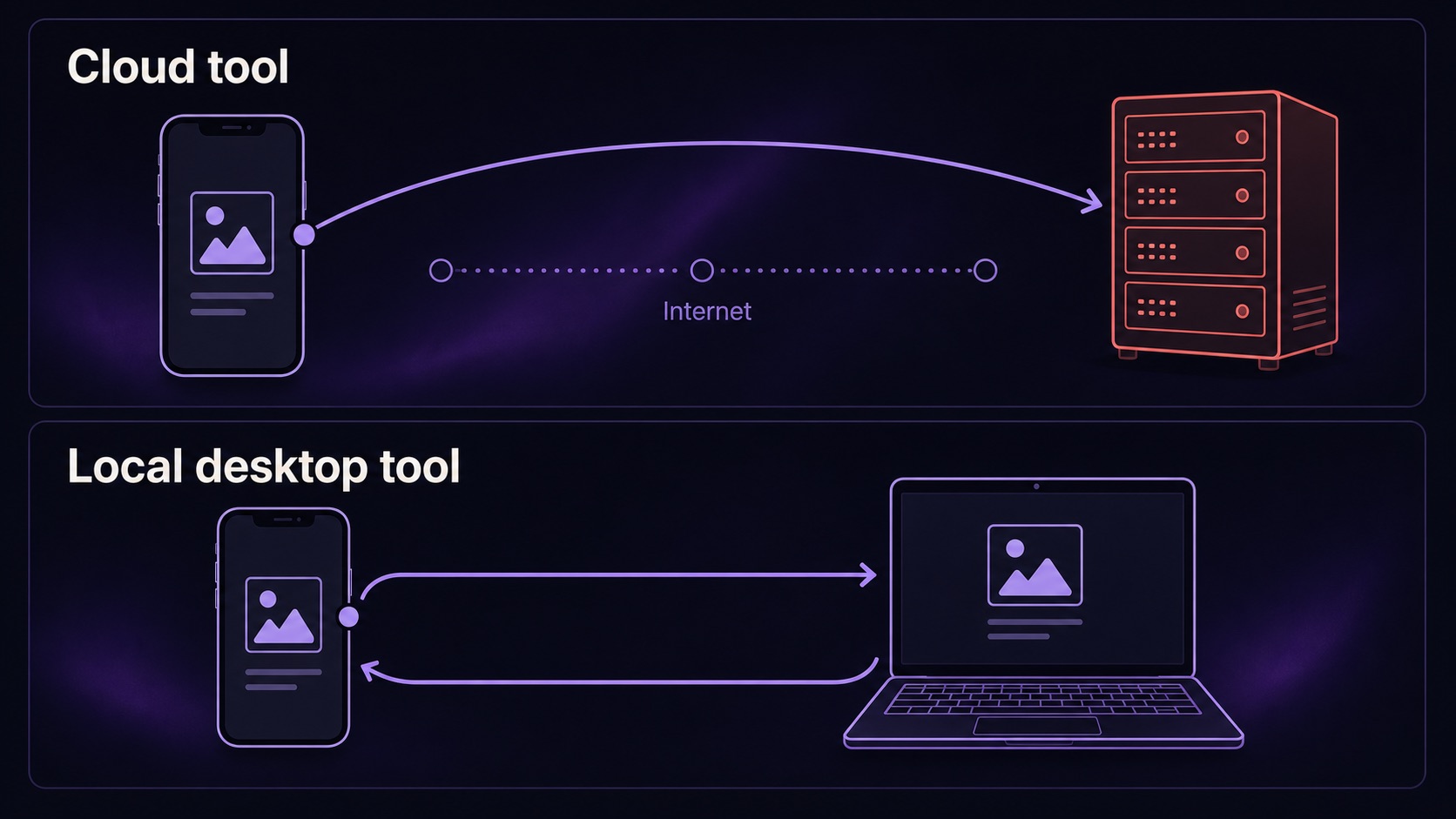
Previewed runs in Chrome on Windows but stores templates in the cloud. ListingShots ships a true native Windows installer with offline project files on local disk.
Windows availability and native desktop install
Browser-based design tools work fine until they don't. A flaky hotel Wi-Fi connection, a vendor outage, or a session-token expiry mid-export each cost a launch hour. A native Windows binary removes the browser tab, the sign-in step, and the round-trip between your machine and a vendor server. Projects live as plain files you can commit to Git or back up to OneDrive on your own terms.
Privacy for unreleased iOS builds
Screenshots from a feature you have not announced yet are competitive information. Web uploaders frequently cache assets on a CDN with predictable URLs, and search engines have been known to index unreleased marketing copy embedded in screenshots. A local-first workflow keeps the file, its hash, and its EXIF metadata on the same disk as your source code — which is both safer and faster than waiting on an upload progress bar between every iteration.
For a deeper look at the offline-first workflow — including no-account activation and zero telemetry — see the offline App Store screenshot generator deep-dive.
3D, panoramas, and app preview maker output compared
The trade-off is honest. If your launch leans on the App Store video slot or on a cinematic 3D mockup for a landing page, Previewed's output is genuinely harder to replicate in a flat-PNG tool. If your launch is the standard store listing pages — five to ten flat screenshots per device class — the extra motion features go unused, and you're paying $228/year for capabilities that never ship to users.
Migrating from Previewed to ListingShots
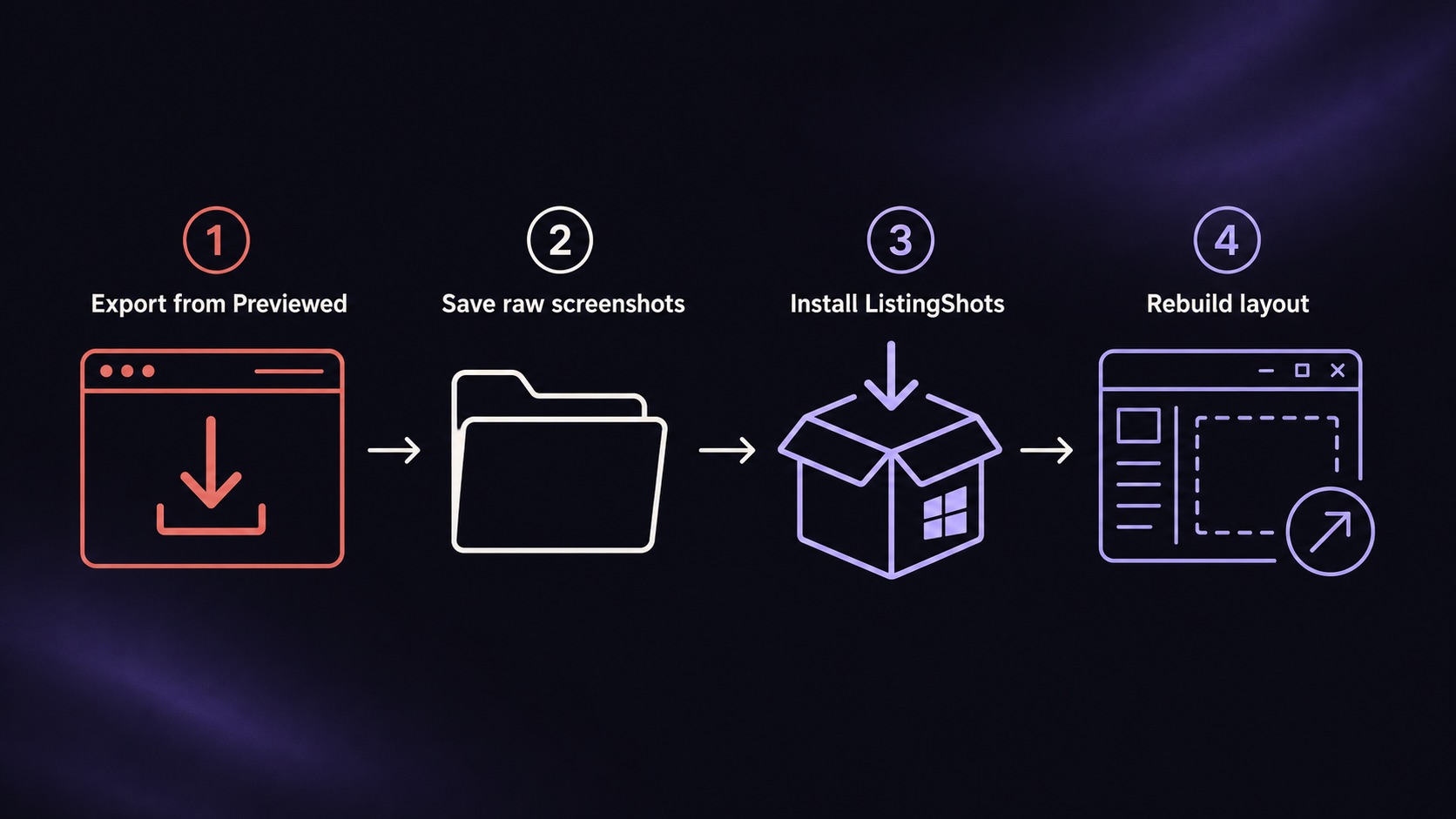
The migration takes one focused afternoon for a typical indie launch. Pull your raw simulator screenshots once, build a single base layout per device class in ListingShots, then batch-export to every required size. After that, every future update or refresh runs through the local app — no cancel-and-resubscribe step before the next launch.
When to pick which
Previewed
Browser-based screenshot and app preview maker
Pricing
Free tier, $9.99 one-time (capped at 10 exports), $19/mo Pro billed annually ($228/yr)
Best for
Premium app launches that lean on 3D, panorama, or promo-video output
Standout
3D animated renders, panoramic device shots, and short promo video exports
Limitation
Cloud-stored templates, account required, no native Windows install, no offline use
ListingShots
Native Mac and Windows desktop app for App Store screenshots
Pricing
$15.99 one-time license, perpetual, future updates included
Best for
Windows indie devs who want a one-time price and offline-first project files
Standout
47 store presets, 26 templates, native Windows installer, no account, no cloud sync
Limitation
Flat PNG output only — no promo video or 3D animated renders
Once a wider option set is published, readers who want more than a head-to-head should also see the broader roundup of app store screenshot tools for solo founders in 2026 — coming soon on this site.
FAQ
Frequently asked questions
ListingShots is safer. It runs natively on Windows or macOS and never uploads your captures, so an unreleased build never touches a third-party server. Previewed is browser-based and stores templates in the cloud, which means your screenshots — and any UI in them — pass through vendor infrastructure before you can export.
Export each Previewed canvas as a flat PNG at its highest resolution and save your raw device screenshots separately. Install ListingShots on Windows or macOS, pick the matching App Store, Google Play, or Microsoft Store preset, drop the raw captures in, and rebuild your layout against ListingShots' 26 templates. Plan roughly an hour per device class for a clean re-style.
Only ListingShots works fully offline. Once installed, it needs no internet connection, no account, and no cloud sync. Previewed runs in your browser and needs an active connection to load templates, save projects, and queue exports, which makes it dependent on vendor uptime.
Yes. ListingShots ships Google Play Store presets at the correct pixel dimensions for phone, 7-inch tablet, and 10-inch tablet listings, alongside App Store, Microsoft Store, and Chrome Web Store sizes. All exports are pixel-perfect PNGs at native resolution and can be batch-exported in one pass.
Yes. Previewed exports short promo videos and 3D animated renders, neither of which ListingShots currently produces. If your launch needs an animated app preview for the App Store video slot, Previewed has the edge. ListingShots only outputs flat PNG screenshots, which is enough for most store listing pages but not for video assets.
ListingShots is the better single-launch buy. Its $15.99 one-time fee beats Previewed's $9.99 tier (capped at 10 exports) and avoids Previewed's $19 per month subscription entirely. After the launch, you keep the app and receive all future updates without paying again.
✦
One price, every store size
One-time $15.99. No subscription. No account. Native desktop app for Mac and Windows.
macOS 12+ · Windows 10+ · One-time purchase