Guide

iPhone 6.5-inch screenshot size: 1242x2688 or 1284x2778?

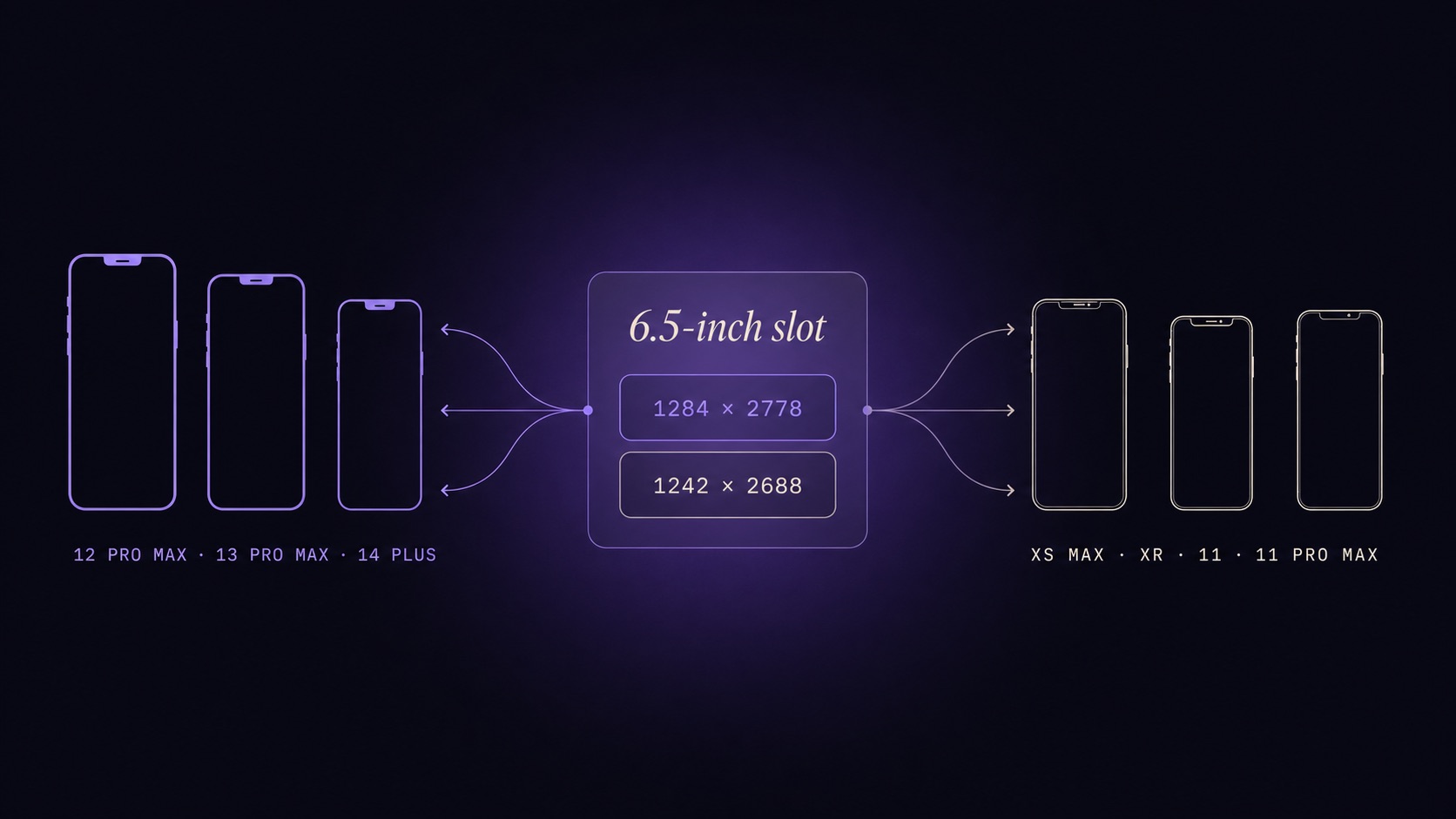
Infographic showing a central 6.5-inch slot label with two stacked rectangles labeled 1284x2778 and 1242x2688, and arrows fanning out to small iPhone silhouettes annotated with XS Max, XR, 11, 11 Pro Max on one side and 12 Pro Max, 13 Pro Max, 14 Plus on the other

You will know exactly which 6.5-inch portrait pixel size to upload for the App Store in 2026, which iPhone models each dimension covers, and when you can safely skip the slot altogether.

Published June 12, 2026 · 7 min read

See ListingShots →

TLDR

Should I upload 1242x2688 or 1284x2778 for the iPhone 6.5-inch App Store slot? Upload 1284 x 2778 for fresh 2026 artwork covering iPhone 12, 13, and 14 Pro/Plus models. Keep 1242 x 2688 only if you are re-using legacy XS Max or 11 Pro Max captures, since both pass Apple's pixel validation under the same slot.

The two pixel sizes Apple accepts for the 6.5-inch slot

Answer: Apple lists two valid portrait dimensions for the 6.5-inch display class: 1284 x 2778 pixels and 1242 x 2688 pixels. Both are stored under the same App Store Connect slot, and either one passes upload validation, which is why competitor pages disagree about which number is correct.

Why two dimensions share one slot. The 6.5-inch class grew with the device lineup. When iPhone XS Max arrived, 1242 x 2688 was the only accepted portrait size. iPhone 12 Pro Max introduced a slightly larger 1284 x 2778 panel, and Apple expanded the same slot's allow-list rather than splitting it. The validator now accepts either dimension as a valid entry, provided every screenshot inside a given upload position matches.

Portrait and landscape orientations. Both dimensions share a 19.5:9 aspect ratio, so the landscape uploads are simply width and height swapped — 2778 x 1284 or 2688 x 1242. Pick one orientation for the slot and keep every file in it consistent; Apple does not auto-rotate, and mixing orientations inside the same shelf triggers a layout warning before review.
Should I upload 1242x2688 or 1284x2778 for the iPhone 6.5-inch App Store slot?

Answer: Upload 1284 x 2778 if you are exporting fresh artwork in 2026, because that is the dimension Apple currently documents and the one most modern tools target. Reach for 1242 x 2688 only when your source artwork was captured on iPhone XS Max or 11 Pro Max and resizing would soften the UI.

When the newer 1284 x 2778 is the safer pick. Any fresh render — whether from the iOS Simulator at iPhone 12 Pro Max or higher, a design-tool canvas locked to integer dimensions, or a Fastlane snapshot — should target 1284 x 2778. Apple's documentation leads with this size, modern presets default to it, and reviewers expect it when sampling a recent submission. There is no downside on legacy devices either, because the slot accepts the new dimension as a valid entry across the whole 6.5-inch class.

When 1242 x 2688 legacy artwork still works. If your master file lives in a tool that exports at the XS Max native size and you would lose UI sharpness by upscaling 42 pixels wide and 90 pixels tall, leave the set at 1242 x 2688. The slot accepts it, validators clear it, and a re-render purely to chase the larger number is rarely worth the resampling cost.

iPhone XS Max App Store screenshot dimensions and what they share with iPhone 11 Pro Max

Answer: iPhone XS Max and iPhone 11 Pro Max both capture natively at 1242 x 2688 pixels and share the same 19.5:9 aspect ratio. App Store Connect treats them as a single upload target, so one PNG set covers both devices without duplicate exports.

Native capture resolution vs upload resolution. Both phones render the device screen at 1242 x 2688 portrait — the same number you see in Settings → Display, the same number the iOS Simulator emits when set to either model, and the same number you upload to App Store Connect. There is no separate "marketing resolution" for this class; the panel dimension is the submission dimension.

Models that share the XS Max slot. Beyond XS Max and 11 Pro Max, the 1242 x 2688 entry also covers iPhone XR and the standard iPhone 11 — they share the same physical panel resolution. Submitting one PNG set for any of those devices is enough; Apple does not require duplicate exports across models in the same class.

Is 6.5 inch screenshot still required in 2026?

Answer: No. Apple now treats 6.5-inch as a fallback class: if you upload a complete 6.9-inch set at 1320 x 2868, App Store Connect scales those assets down for older Pro Max viewers automatically. You only need a dedicated 6.5-inch upload when you skip the 6.9-inch slot.

When scaled-down art is good enough. Apple's fallback chain cascades from 6.9-inch down through 6.7-inch and 6.5-inch. Upload one 1320 x 2868 set, and viewers on a 6.5-inch device get an automatically downscaled version that fills the panel with no visible artefacting on most UI. For the vast majority of listings, that is indistinguishable from native — a separate 6.5-inch upload buys nothing.

When uploading native 6.5-inch artwork pays off. Dense screenshots — small text in tabular data, fine icon strokes, gradient banding — soften slightly when downscaled. If A/B testing shows a real conversion lift from native artwork on legacy Pro Max devices, ship a dedicated set. Otherwise the cascade is the better default. For the complete cascading-size picture, see the App Store screenshot sizes 2026 reference.

1284 x 2778 vs 1242 x 2688: which devices ship at each size

Answer: 1284 x 2778 was introduced for iPhone 12 Pro Max and continues to cover 13 Pro Max and 14 Plus. 1242 x 2688 belongs to the older XS Max, XR, iPhone 11, and 11 Pro Max generations. Pick the dimension that matches the device your screenshots originate from.

Device-to-dimension map. The table below lays the two 6.5-inch dimensions alongside the adjacent 6.7-inch and 6.9-inch slots so you can match each export to the right iPhone generation in one glance. The comparison also makes the proximity to the 6.7-inch slot obvious — the next section expands on why that gap matters.

Display class

Portrait (px)

Landscape (px)

Devices covered

Required in 2026?

6.5-inch (modern)

1284 × 2778

2778 × 1284

iPhone 12 Pro Max, 13 Pro Max, 14 Plus

Optional — auto-filled from 6.9-inch

6.5-inch (legacy)

1242 × 2688

2688 × 1242

iPhone XS Max, XR, 11, 11 Pro Max

Optional — auto-filled from 6.9-inch

6.7-inch

1290 × 2796

2796 × 1290

iPhone 14/15 Pro Max, 15/16 Plus

Optional — auto-filled from 6.9-inch

6.9-inch (lead)

1320 × 2868

2868 × 1320

iPhone 16/17 Pro Max, iPhone Air

Yes — cascades to all smaller iPhone slots

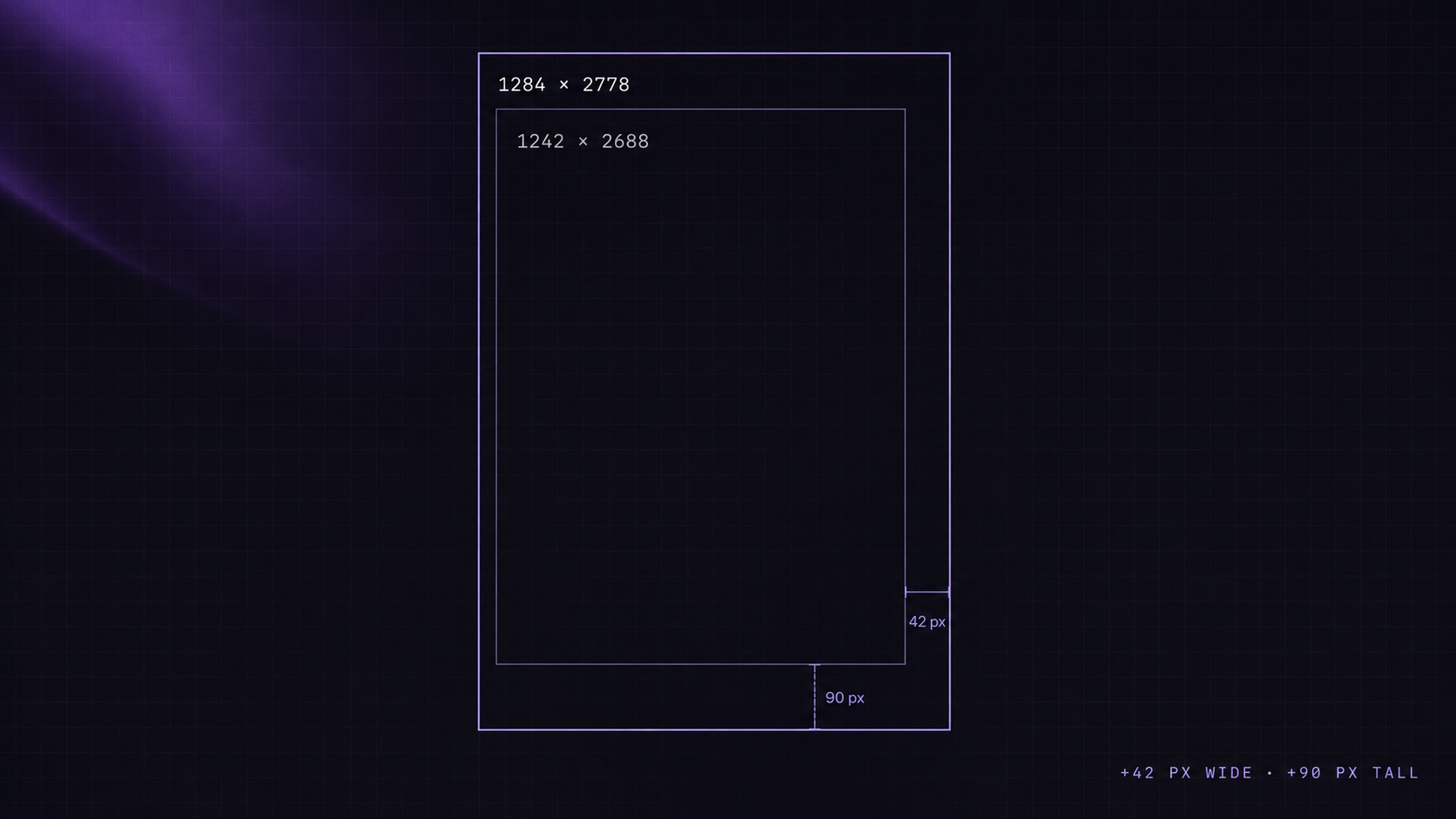
Pixel delta and aspect ratio math. The jump from 1242 x 2688 to 1284 x 2778 is 42 pixels wide by 90 pixels tall — about 3.4% per axis. The jump from 1284 x 2778 up to the 6.7-inch slot at 1290 x 2796 is just 6 pixels wide by 18 tall. All three sizes share the 19.5:9 aspect ratio, which is why the validator can cascade them into one another and why the 6.7-inch slot remains accepted under the broader 6.9-inch umbrella too.

Side-by-side dimension diagram with two outlined rectangles drawn to scale, the larger labeled 1284 x 2778 and the smaller labeled 1242 x 2688, overlapping at the top-left corner with the pixel delta marked along the bottom-right edge

Export the 6.5-inch slot from Windows or Mac with a one-time-purchase App Store screenshot generator

Answer: You do not need a Mac, Figma seat, or monthly subscription to ship a 6.5-inch upload. A native App Store screenshot generator on Windows or Mac takes your raw PNG, applies a device frame, and exports the exact 1284 x 2778 or 1242 x 2688 file App Store Connect expects.

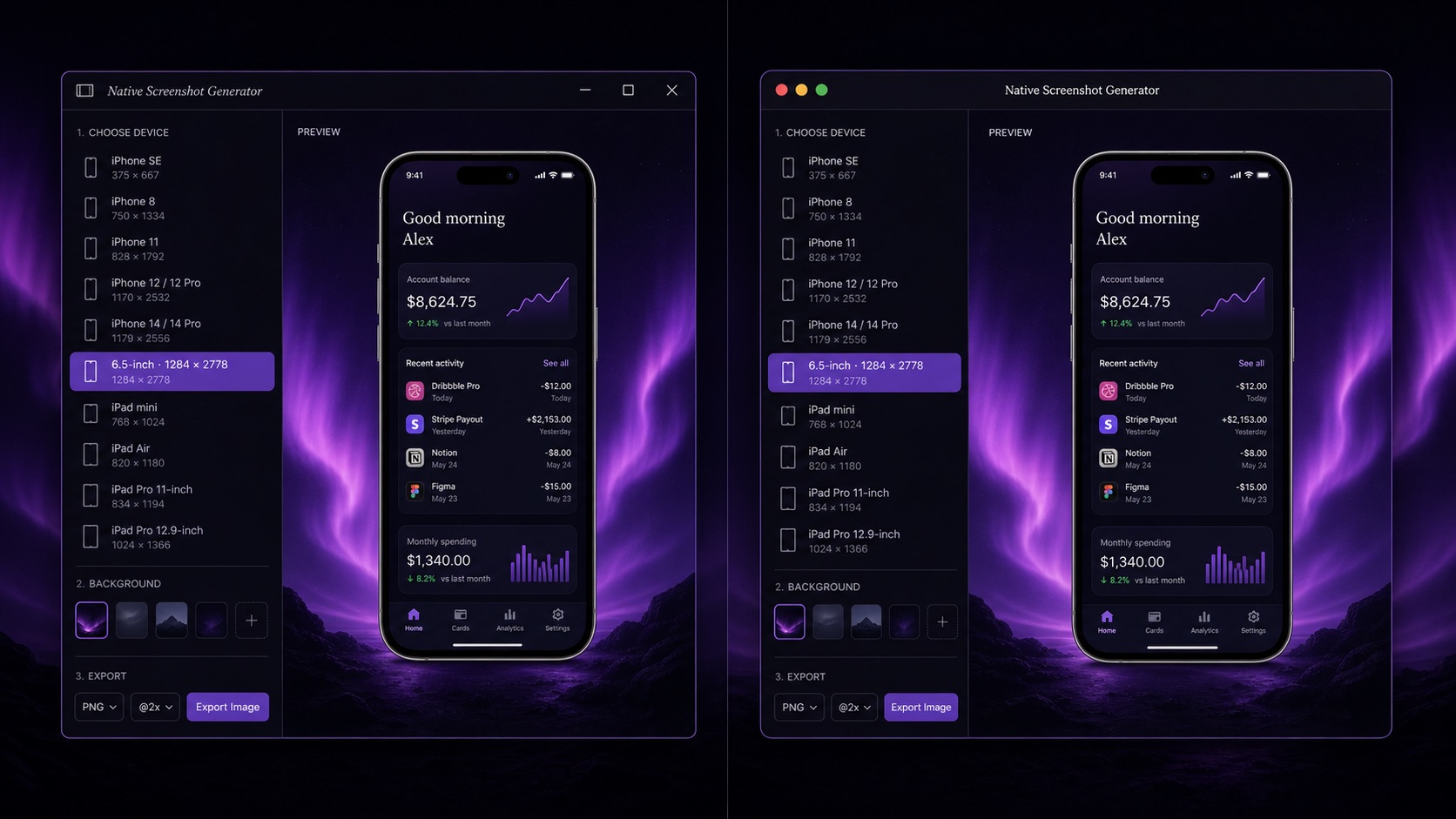
Windows-friendly export workflow. Drop a raw simulator capture or master canvas into a local desktop tool that ships with preset canvases for both 6.5-inch dimensions. The app frames the screenshot in the correct device chrome, exports at integer pixel counts (sRGB, no alpha), and writes the file straight to disk. No cloud round-trip, no browser upload, no subscription renewal — the same one-time-purchase install handles every other store size from the same source file.

Avoiding uploads of unreleased UI to web tools. Most browser-based generators ask you to upload simulator captures — and any embedded marketing copy — to a third-party CDN before your app is publicly listed. Caches and indexers can pick those assets up before launch day. A local tool keeps every frame on your own disk, which is both faster (no upload progress bar between iterations) and safer for anything pre-announcement. See why offline matters for App Store screenshots for the longer argument.

Split-screen illustration of a Windows desktop on the left and a Mac desktop on the right, both running the same local screenshot generator with a 6.5-inch export preset selected and a framed iPhone screenshot previewed in the centre of each window

Common rejection reasons for 6.5-inch uploads

Answer: Most 6.5-inch rejections come from off-by-one resizing, mismatched aspect ratios from cropped status bars, or PNGs saved with an embedded color profile App Store Connect cannot parse. Confirm the exact pixel count, strip metadata on export, and re-check both portrait and landscape orientations before submitting.

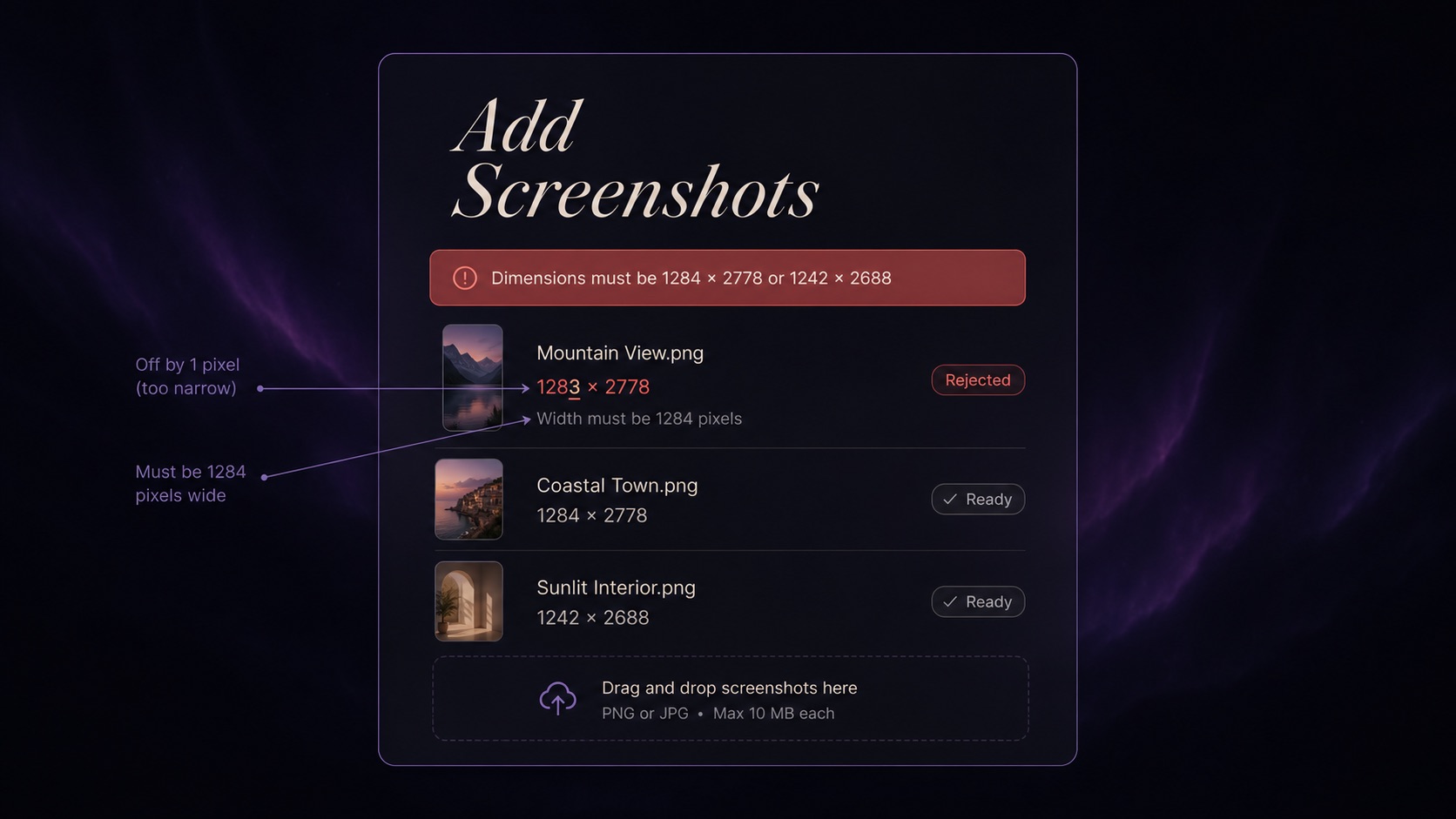
Pixel-count mismatches. Apple's validator accepts 1284 x 2778 and 1242 x 2688 exactly; a 1283 x 2778 or 1284 x 2777 file is rejected outright. The most common silent failure is a design tool exporting at a fractional scaling factor that lands one pixel off. Lock the canvas to integer dimensions and re-export from the master rather than scaling a downstream file.

Color profile and PNG metadata issues. Embedded Display P3 profiles, alpha channels on opaque PNGs, and unusual EXIF metadata all trip the validator even when the pixel count is exact. Convert to sRGB, flatten the layer stack, and strip metadata on export. For a full troubleshooting walk-through covering every common rejection trigger, see the App Store Connect screenshot rejected fix-it guide.

UI mockup of an upload modal with a red error banner stating Dimensions must be 1284 x 2778 or 1242 x 2688, a rejected file row showing a 1283 x 2778 thumbnail highlighted in red, and callout arrows pointing at the mismatched pixel count

FAQ

Frequently asked questions

Export every 6.5-inch size, locally

One-time $15.99. No subscription. Native desktop app for Mac and Windows that batch-exports 1284 x 2778, 1242 x 2688, and every other required size from a single canvas — without uploading unreleased UI to a server.

Buy ListingShots — $15.99Download the installer

macOS 12+ · Windows 10+ · One-time purchase

App Store screenshot sizes 2026 →iPhone 6.7-inch screenshot size →